

You shortlisted Odoo. The demo looked right. The pricing made more sense than the alternatives. And then someone in the room asked the question that derails every ERP shortlist: “But can it work the way we actually work?”
The answer was yes. It always is. What followed was probably a confident nod toward customization, maybe a slide about flexibility and scalability. What it almost certainly did not include was a straight answer about what customization actually involves, what it ends up costing, or what happens when Odoo ships its next major version and half your custom code needs reworking.
That is the conversation worth having before you sign off on a scope. Odoo customization services are genuinely powerful when the right things get customized. They become a slow-motion problem when they are not. And the difference between those two outcomes is usually decided in the first few weeks of a project.
What “Odoo Customization Services” Actually Means
Most people use the word customization loosely. It covers whatever gap exists between what Odoo does out of the box and what a business needs it to do. But that gap can be filled in four very different ways, each carrying a different price tag, risk profile, and maintenance burden.
Here is what you are actually choosing between:
- Configuration: Adjusting native Odoo settings: approval workflows, user roles, tax rules, product categories, email templates. No code involved. Fully reversible. This should always come first, before anything else is considered.
- Odoo Studio: A drag-and-drop tool for changing forms, adding fields, and building basic automations. Lower risk than writing code, but limited in scope.
- Odoo module customization: Python-based development that extends or overrides existing Odoo modules. This is where real capability lives. It’s also where upgrade risk starts accumulating.
- Custom module development: Building entirely new functionality from scratch when none of Odoo’s 30-plus apps cover the use case.
The first job of any serious Odoo customization services engagement is figuring out which lever a requirement actually needs. Using custom code when Studio would do the job wastes budget and creates debt. Using Studio when the problem genuinely requires module-level development creates a fragile workaround that tends to break at the worst possible moment.
The Four Areas Where Odoo Customization Delivers Real Value
Odoo Module Customization
Odoo module customization is where the platform’s real flexibility lives. Python-based extensions let developers add fields, change business logic, override default behaviors, and connect external systems in ways the native UI simply cannot reach.
Use cases that genuinely need module-level work:
- Compliance logic specific to your industry that Odoo’s standard modules don’t handle
- Complex pricing or margin rules that go beyond what native pricelists support
- Integrations with external systems: WMS platforms, MES tools, customs portals, or industry APIs needing bidirectional data sync
- Multi-module workflow logic with conditional branching that native automation tools cannot manage
Write customizations as thin overrides, not deep rewrites. Every line of code added to an existing module is a line you’ll need to reconcile at the next major upgrade. The best Odoo module customization work is surgical. Minimum footprint, maximum impact.
Odoo UI Customization
Odoo UI customization covers changes to views, forms, list layouts, dashboards, and kanban and calendar interfaces. Get it right and your team actually uses the system properly. Get it wrong and you end up with undocumented workarounds nobody wants to touch.
What consistently works well at the UI level:
- Simplified forms for specific roles, so people only see what they need to act on
- Computed fields that surface key data without requiring navigation to another screen
- Custom dashboards pulling metrics relevant to a specific team or function
- Role-based view restrictions that cut error rates in high-volume workflows
Odoo Studio handles most of this safely. When requirements involve conditional visibility, dynamic field behavior, or integration with custom modules, that crosses into development territory. Scope it accordingly.
Odoo Workflow Automation
Odoo workflow automation is one of the highest-ROI, lowest-risk areas to invest in. Automations remove manual steps, enforce process consistency, and quietly eliminate the human error that builds up in any high-volume operation.
The automation use cases that actually move the needle:
- Approval routing triggered by order value, product category, or customer tier
- Email and SMS notifications at specific pipeline or order stages
- Scheduled actions that update records, generate reports, or sync data on a defined timetable
- Automatic document generation for quotes, purchase orders, and delivery notes based on status changes
Odoo’s native automation engine covers a surprising amount of this without any custom code. Development only becomes necessary when triggering logic spans multiple models or involves external API calls.
Odoo Report Customization
Standard Odoo reports cover common scenarios well. They rarely cover the exact format your customer expects, the KPI layout your management team needs, or the regulatory report a government authority requires.
Odoo report customization typically covers:
- Web template development for customer-facing documents: invoices, delivery notes, and quotations built to your exact brand standards
- Custom pivot and graph views for internal dashboards and operations reporting
- Excel or PDF exports tailored to specific operational or compliance needs
- Localized report formats for country-specific or industry-specific regulatory standards
Report work carries lower risk than module customization because it touches how data is displayed, not how it’s processed. But it’s still code. It still needs maintenance.
Not sure whether your requirements need configuration, Studio, or actual development? Most over-budget Odoo projects started with the wrong answer to exactly that question.
Talk to our Odoo experts at Intech before the scope is locked.
Getting the architecture right upfront is far cheaper than fixing it later.
Odoo Studio vs. Custom Development: Choose Wrong and You Pay for It at Every Upgrade
This is the decision most implementation partners rush past. Odoo Studio vs custom development is not just a cost question. It’s a question about how much ongoing maintenance pain you’re willing to absorb at every upgrade cycle.
The practical split:
- Use Studio when the change is presentational, the automation logic is straightforward, and the requirement is unlikely to evolve significantly over the next two to three years
- Use custom development when the logic is complex or conditional, the integration involves external systems, or the use case is genuinely core to how your business operates
- Start with configuration before either Studio or development enters the conversation, and document what native Odoo can’t cover before scoping anything
The classic mistake is choosing Studio because it feels safer, then discovering halfway through that it cannot do what’s actually needed. The rebuild costs more than the original development would have. The opposite mistake is just as expensive: treating every requirement as a custom development problem, which turns every Odoo upgrade into a months-long reconciliation project.
McKinsey found that only 20% of companies manage to capture more than half the projected benefits from their ERP systems. The gap between what was promised and what was delivered almost always traces back to the same place: decisions made before the first line of code was written. The projects that do capture full value are the ones that drew a clear line between what genuinely needed customizing and what needed configuring, and held that line throughout implementation.
What Odoo Customization Actually Costs
The number in the proposal is rarely the final number. Not because anyone’s being dishonest. Because most proposals only capture one of three cost components.
Here’s the full picture:
- Development cost: The upfront build, test, and deployment time. Studio modifications: $500 to $3,000. Module-level customizations: $5,000 to $25,000. A full custom module with complex logic: $30,000 to $100,000 or more.
- Maintenance cost: Gartner projects that by 2027, more than 70% of recently implemented ERP initiatives will fail to fully meet their original business goals. Customization debt is one of the clearest predictors of that outcome. Every modification that is not properly scoped, documented, and budgeted for at upgrade time is a quiet drag on the ROI your business case promised.
- Opportunity cost: The hours your team spends managing upgrade delays, code bugs, and undocumented workarounds never appear in a cost model. They show up in every retrospective, though.
The development cost is just the entry fee. The five-year cost of ownership, across every upgrade cycle that touches your custom code, is the number that actually matters.
The Year-Two Reckoning: What Happens When You Over-Customize
This scenario plays out more often than any Odoo partner will admit in a sales conversation.
A mid-sized manufacturing business implements Odoo with fifteen custom modifications. The implementation goes reasonably well. The system works. The team adapts. Then twelve months in, Odoo releases a major version with exactly the manufacturing improvements the operations team has been waiting for.
The upgrade assessment lands: eight of the fifteen customizations conflict with the new core. Three need full rewrites. Two others have become redundant because Odoo now handles those functions natively. Estimated cost to upgrade: $40,000 and six weeks of testing.
That’s the year-two reckoning. Nobody planned for it. Nobody budgeted for it. And it’s not bad luck. It’s the entirely predictable result of customizing without a maintenance strategy.
The organizations that sidestep this build one discipline in from the start: every customization gets a documented business justification, an owner, and a review trigger tied to Odoo’s release cycle. When the next upgrade comes, they know exactly what they have, why they have it, and what Odoo now covers natively. That review process is what turns Odoo customization services from a liability into a managed asset.
Heading into an Odoo upgrade with customization debt you haven’t mapped?
The cost of reconciling custom code compounds with every version you delay.
Talk to our Odoo experts at Intech for a clear picture of what your upgrade path actually looks like.
Odoo Over-Customization Risk: The Patterns Worth Watching For
Odoo over-customization risk doesn’t show up all at once. It accumulates quietly until an upgrade or a team change makes it impossible to ignore.
The warning signs that tend to precede a painful reckoning:
- Customizing to preserve legacy processes: “Make Odoo work like our old system” is almost always the wrong brief. It locks outdated workflows into code and makes them far harder to change later.
- Workarounds built on workarounds: When a customization exists because the right solution feels too slow or too complex, you end up with brittle code built on assumptions that will eventually shift.
- Nothing documented: Every undocumented customization is a future liability. When the developer who built it is no longer available, the organization is left reverse-engineering its own system.
- Scope creep during implementation: Small, individually reasonable additions that compound into a system far heavier than the original scope intended.
The problem is never customization itself. It’s customization without any governance structure around it.
How to Scope Odoo Customization Services Without Building a Future Problem
The scoping conversation is where this goes right or wrong. A partner worth working with will push back on requirements solvable through configuration, ask whether a process redesign is an option before writing code, and flag which customizations carry real upgrade risk.
A scoping process that actually protects you:
- A configuration-first review mapping every requirement against native Odoo capabilities before any development is scoped
- Risk classification for each item: low (Studio or configuration), medium (module extension), high (custom module or core override)
- A documentation standard agreed upfront: every customization gets a justification, an owner, and a review trigger tied to Odoo releases
- Five-year maintenance cost included in the business case, not treated as a separate future conversation
The goal of building a tailored Odoo ERP is a system that fits today’s operations and adapts as the business changes. That’s achievable. It just requires a partner who’s more interested in the right outcome than in maximizing development scope.
Customization Done Right Compounds. Done Wrong, It Costs You Every Year
Odoo’s flexibility is real. The tailored Odoo ERP advantage is not marketing. Organizations that get customization right end up with a system that genuinely reflects how they operate, connects to the tools they use, and scales without drama.
The ones that struggle share a common pattern:
- They customized broadly instead of selectively, without clear justification for each modification
- They reached for code when configuration or Studio would have done the job
- They left upgrade planning for a later conversation that never happened
- They worked with partners who said yes to everything and documented nothing
Getting this right isn’t complicated. It just requires asking the hard questions before the scope is signed, not after the first upgrade fails.
What a Certified Odoo Partner Does Differently
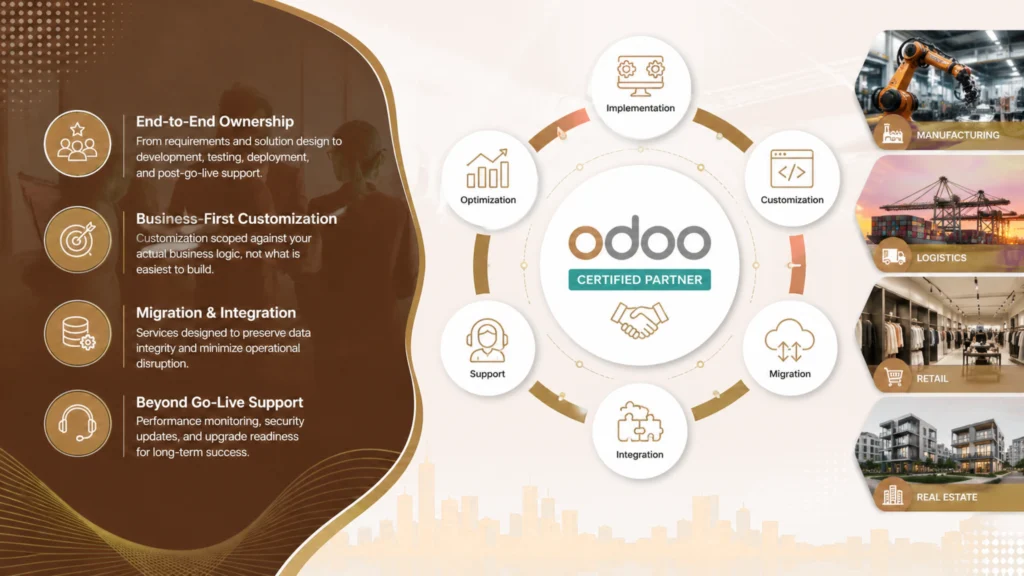
Intech is a certified Odoo partner with experience across implementation, Odoo module customization, migration, integration, and ongoing support. The team works across industries including manufacturing, logistics, retail, and real estate, which matters because the customization decisions that make sense in a port terminal operation look very different from the ones that make sense in an apparel business.
What that experience produces in practice:
- End-to-end ownership from requirements definition and solution design through development, testing, deployment, and post-go-live support
- Customization scoped against your actual business logic, not against what is easiest to build
- Migration and integration services designed to preserve data integrity and minimize operational disruption
- A support model that does not end at deployment, covering performance monitoring, security updates, and upgrade readiness
Intech’s position as a certified Odoo partner also means access to the latest Odoo updates, established implementation methodology, and a team that has navigated enough upgrade cycles to know which customizations age well and which ones become liabilities.
The goal is an Odoo tailored ERP that fits how your business operates today and does not require a painful reconciliation every time a new version ships.
Talk to our experts at Intech and leave with a plan that’s honest about cost, risk, and what to leave alone.
FAQs
What is included in Odoo customization services?
Odoo customization services cover Odoo module customization, Odoo UI customization, Odoo workflow automation, and Odoo report customization. Any serious engagement starts with configuration before touching code.
How much does Odoo customization cost?
Studio modifications run $500 to $3,000, module-level work $5,000 to $25,000, and full custom modules $30,000 to $100,000 or more. Maintenance typically costs more than the build over a five-year period.
What is the difference between Odoo Studio and custom development?
Odoo Studio is a low-code tool for forms and simple automations with minimal upgrade risk. Custom development is Python-based, more powerful, and carries higher long-term maintenance cost.
What are the biggest Odoo over-customization risks?
The main one is getting locked into an older Odoo version because the upgrade cost has become too high. Organizations that over-customize often miss security patches and new native features as a result.
How do I know if my requirements need customization or just configuration?
Run a configuration-first audit before any development scope is written. If Odoo’s native tools cover it, use them. Custom code is for cases where they genuinely cannot.
What should I ask when evaluating Odoo customization services providers?
Ask how they handle customizations at upgrade time and whether five-year maintenance cost appears in their proposals. Partners who push back on unnecessary customization are the ones worth hiring.
Can you fix Odoo customization debt after a messy implementation?
Yes. Audit what exists, retire anything Odoo now covers natively, document everything that remains, and set a review cadence tied to Odoo’s release cycle.
