

Logistics companies and supply chain businesses frequently encounter operational challenges, which can result in lower profits and missed opportunities in a growing market. A significant challenge that many supply chain businesses face is a lack of visibility across operational sites.
Especially, global companies with supply chain operations spanning across locations need improved visibility. This ensures optimal container movements, delay forecasting, and low-cost operations. It is crucial for mid-sized logistics businesses, with the total cost of operations estimated to reach $600 billion by 2035.
While traditional ERP systems do offer some visibility, they still suffer from issues of data silos and a lack of detailed insights. Odoo ERP helps businesses overcome these shortcomings by centralizing data, synchronizing it in real-time, and providing advanced insights. However, there are also challenges to implementing Odoo. Most mid-sized logistics companies have decision-making creep when it comes to Odoo implementation due to the following queries,
- Why is Odoo ERP critical?
- What is the Odoo implementation cost?
- What are the benefits of Odoo ERP?
- How does Odoo ERP differ from traditional ERP?
All of your queries are answered by our team of Odoo experts in this article. It covers everything from what Odoo ERP is for mid-sized logistics companies, its benefits, cost-benefit ratio, and how it differs from traditional systems. So, let’s get started.
What is an Odoo ERP?
Odoo ERP is an open-source software platform that offers integrated business management capabilities. It comes with a suite of modular applications that help you handle different business operations. This includes sales, accounting, inventory, and manufacturing.
Odoo ERP systems provide customizable, scalable, and secure apps that logistics businesses can tailor to meet their operational needs.
Why is Odoo ERP Important For Mid-Sized Logistics Businesses?
Odoo ERP offers an integrated, modular design in a centralized platform for mid-sized companies. This means end-to-end operational management and enhanced visibility for the logistics business. It unifies warehouse, shipping, sales, and finance into a single real-time system. This helps mid-sized companies automate the pick, pack, and ship process, reducing errors and cycle times.
An Odoo ERP system enhances on-time delivery while offering lower total costs and providing modular growth paths. It also provides native inventory/WMS, barcode workflows, carrier connectors, and integrated accounting and reporting. This helps teams gain end‑to‑end visibility and control without juggling disconnected tools or spreadsheets.
What makes Odoo different?
Odoo is modular and open-sourced. Logistics teams can utilize it to easily automate key operations across departments, including inventory, purchasing, sales, and shipping. Furthermore, teams can also add business management capabilities for manufacturing, fleet management, or accounting as volume and complexity increase.
Real-time stock moves, barcode-driven operations, and built-in analytics replace manual reporting hassles. This provides managers with a live control tower for inventory and fulfillment decisions. A robust connector ecosystem enables rate shopping, label printing, and tracking with major carriers and aggregators. It enables mid-sized logistics companies to consolidate their work into a single workflow.
Logistics workflows that Odoo ERP makes efficient,
- Automated replenishment and forecasting to avoid stockouts and shorten cycle times with rules based on demand and lead times.
- Multi‑warehouse, multi‑company, and transfer orchestration to support regional hubs and 3PL scenarios from one system.
- Serial traceability and FEFO for regulated or perishable goods, where audit trails and expiry control are critical.
- Carrier rate shopping and label generation with tracking updates embedded in the shipping workflow to reduce freight spend and clicks.
- Reverse logistics with RMAs and put-away rules to speed up returns processing and inventory re‑entry.
- Integrated invoicing and landed cost handling so operational events flow cleanly into accurate financials.
With the Odoo ERP, businesses can reduce the time taken to process shipments to 15 seconds by utilizing standardized delivery terms. It also provides greater accuracy in reporting, better utilization of space, and customer satisfaction with the extensive use of warehouses.
Using real-time logistics orchestration and analytics to reduce costs, serve, and improve on-time-in-full (OTIF) by reducing cycle times and providing the capability to handle exceptions proactively. Fleet visibility and route optimization enable the minimization of fuel consumption and delays, as well as enhanced reliability of ETA and compliance with drivers.
Now that you know using the Odoo ERP for your logistics operations is essential, understanding the ROI is also necessary. Especially, making a business decision to integrate Odoo ERP into your existing system does require a proper estimation of ROI.
How to Calculate Odoo ERP Integration ROI For Logistics Business?
Calculating the ROI for your mid-sized companies requires data on annual savings, costs, and insights on labor hours, freight optimization, error reduction, and lower inventory carrying costs.
Here is a formula you can use,

To understand the total payback in terms of time saved for your logistics operation, use the following formula,

You will also need data on current pick lines/hour and error rate, average dock‑to‑stock time, weekly carrier mix, and inventory turns. However, the implementation part is essential. If you get it right, the ROI will be higher.
How to Implement Odoo ERP for Your Logistics Operations?
Here is a 90-day implementation blueprint that you can use to integrate Odoo ERP modules customized to your specific operations.
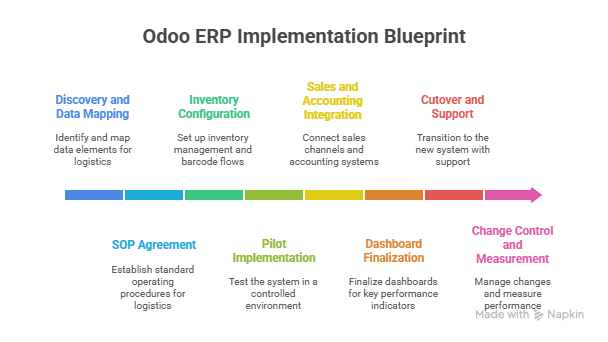
- Weeks 1–2: Discovery and data model map products, units, lots/serials, locations, and delivery terms; agree on SOPs for inbound, picking, and shipping.
- Weeks 3–6: Configure Inventory, barcode flows, replenishment rules, and core carriers; pilot in 1 warehouse/zone with handheld scanners and live KPIs.
- Weeks 7–10: Integrate sales channels and accounting, enable rate shopping and label printing, and finalize dashboards for OTIF, pick rate, and accuracy.
- Weeks 11–12: Cutover with staged ramp, floor support, and daily standups; lock change control and measure baseline vs target KPIs.
Implementing this blueprint carries risks, so it is essential to have specific controls in place to ensure optimal logistics and supply chain operations.
What are the key Risk controls and Mitigations for Odoo ERP Integrations?
Odoo ERP integrations do have risks like configuration issues, data quality problems, change management hassles, and scaling creep. Overcoming these challenges and ensuring better risk controls requires well-planned integration.
Here are some key risk controls to consider.
- Connector reliability: Validate carrier features and SLAs, configure failover label workflows, and manual override for edge cases.
- Data hygiene: Enforce IoT capture, barcode standards, and cycle counting cadences to maintain the trustworthiness of the digital twin.
- Change management: Standardize pick paths, scanner prompts, and exceptions to reduce cognitive load and training time on the floor.
- Performance scaling: Scale modules and infrastructure as order volume grows, leveraging modular extensions and capacity planning.
- Compliance and auditability: use traceability, user permissions, and event logs to meet customer and regulatory requirements.
Now that you know the risks, how to control them, and most importantly, understand the ROI. However, one key aspect to consider when calculating the cost-benefit ratio and ROI is the cost itself.
How Much Does Odoo ERP Integration Cost?
Odoo licensing, subscription plans, user numbers, hosting, and potential discounts all contribute to the cost of integration. Let’s understand the licensing models first,
Odoo ERP Licensing Models- Community vs. Enterprise
Here is the cost breakdown for the community licensing models of Odoo ERP integrations.
| Licensing Factors | Community ERP Model | Enterprise Odoo ERP |
| Cost | Free and open-source | Subscription-based |
| Features | Core ERP functionalities (Sales, basic CRM, Inventory, basic Accounting, Manufacturing). Lacks many advanced Enterprise features, Odoo Studio, and official mobile apps. | Community features plus advanced modules |
| Support | Community forums, third-party providers (paid). | Official support from Odoo S.A. or certified partners. |
| Customization | Fully customizable with Python expertise (complete source code access). | Extensive customizations through Odoo Studio and custom Python development. |
| Upgrades | Self-managed, it can be complex with customizations. | Odoo partners provide upgrade assistance, which is generally smoother. |
| Target Businesses | Small businesses, startups with technical skills, or those with very tight budgets. | Businesses of all sizes need advanced features, scalability, official support, and mobile access. |
With an understanding of costs, risk controls, and ROI calculations, you will be able to determine the cost-to-benefit ratio of Odoo ERP integrations. However, getting the integration right is essential.
Steps to Integrate Odoo ERP For a Higher Cost-to-Benefit Ratio.
Implementing Odoo ERP is more than a technical upgrade it is a business transformation that directly impacts efficiency, visibility, and ROI. The key to achieving a higher cost-to-benefit ratio lies in how systematically you approach the integration. A well-structured implementation ensures faster payback, minimal disruption, and sustainable performance improvements across logistics operations.
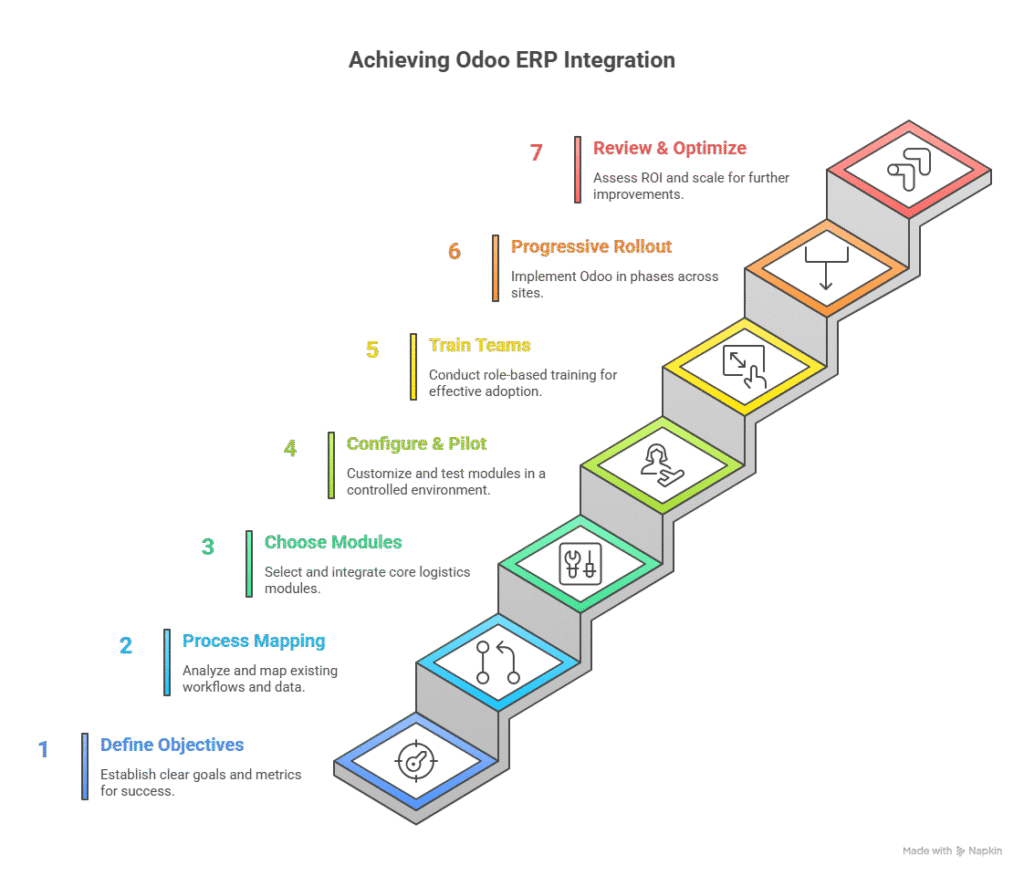
Below are the strategic steps that mid-sized logistics companies can follow to achieve a successful Odoo ERP integration, delivering a measurable ROI.
Step 1: Establish Effective Objectives and Measures of Success.
Starting the integration, you need to determine what success means to your business. These involve determining key performance indicators (KPIs), including pick rate per hour, OTIF percentage, dock-to-stock time, and freight cost per shipment. These measures will serve as your standard for measuring the gains after implementation. Develop them in accordance with business objectives, such as improved delivery, faster order processing, and reduced manual interfaces.
Step 2: Process Mapping and Data Preparation.
Examine your current work processes, data, and system relationships to identify areas for improvement. Record all the processes inbound to dispatching, inventory movements, returns, and billing. Identify data weaknesses and standardize product codes, units of measure, and carrier terms to ensure uniformity in all relevant data. Pre-clean and validate data to facilitate the removal of delays in synchronizing data between Odoo modules and current tools.
Step 3: Select the Appropriate modules and integrations Scope.
The modular framework of Odoo creates flexibility, and the selection of an excessive number of modules may slow down ROI. The initial modules to consider are those based on core logistics, and more advanced modules can be considered in subsequent stages.
Many workflows do not directly impact your cost centers, such as maintaining your stock and equipment. You should first integrate only those workflows that directly impact your costs. These can be factors that affect the costs, such as order fulfillment, carrier management, and invoicing. This gradual implementation is both cost-effective and has a high adoption speed.
Step 4: Configure, Customize, and Pilot in a Controlled Environment.
Create Odoo modules according to the SOPs that have been mapped. Formulate workflows tailored to warehouse operations, incorporating barcodes and replenishment policies. After setup, test a pilot of a single warehouse or a zone.
Meanwhile, during the pilot, check KPIs such as scan accuracy, cycle time, and exception rates. Elusive configuration gaps should be addressed at the start of the rollout to prevent them from multiplying toward the end.
Step 5: Train Teams and Manage Change Effectively.
The key to the ERP ROI is employee adoption. Carry out role-based training- warehouse teams, barcode and picking teams, finance teams, accounting processes, and managers’ dashboard monitoring. Precisely define the SOPs and exception handling rules to minimize brain strain in the transition. Reduce the learning curve using visual aids.
Step 6: Progressive Rollout and Continuous Monitoring
Avoid a big-bang deployment. Implement Odoo in phases/ different locations. This reduces interference and facilitates quicker feedback mechanisms. The performance metrics to be monitored using daily standups are pick accuracy, order cycle time, and label generation success rate.
Implement a control tower dashboard in Odoo to see all real-time logistics data and determine anomalies on the graphical interface. Continuous monitoring allows you to refine automation rules and workflows once they are live.
Step 7: Optimize and Review ROI and Scalability.
Compare actual KPIs and pre-defined ROI benchmarks after 60-90 days of deployment. Evaluate quantifiable benefits like less labor time, less freight costs, and better space utilisation. To multiply cost savings, identify modules or processes that can be scaled.
Performance reviews conducted within 90 days after Odoo implementation typically achieve a 25-40% increase in ROI, as the system becomes more optimized more quickly.
Final Takeaway
Achieving a higher cost-to-benefit ratio with Odoo ERP doesn’t depend solely on the software. It depends on disciplined implementation, structured data, and user adoption. Mid-sized logistics companies that follow a phased, data-backed approach can ensure faster ROI.
Plus, the correct implementation of Odoo ERP modules can ensure stronger process control and sustainable growth. This is where INTECH can help with an experienced team of Odoo experts. Contact us now to explore customizable Odoo ERP solutions.
FAQs
How long does the implementation of the Odoo ERP take at a mid-sized logistics company?
Implementing Odoo ERP typically takes approximately 90 days, done in phases that include discovery, configuration, pilot testing, and full deployment.
Is Odoo ERP compatible with current logistics software or carrier systems?
Yes. Odoo has robust APIs and third-party connections, enabling seamless integration with commonly used carrier systems, WMS tools, and accounting software.
Can Odoo ERP be used in a multi-warehouse environment or in a 3PL setting?
The multi-warehouse and multi-company features of Odoo are suitable in cases where 3PLs and regional logistics networks require centralized control and visibility.
