

Odoo is one of the most popularly used ERP platforms, with over 13 million global users worldwide. Small and medium-sized businesses adopt Odoo because it’s cost-efficient, modular, and flexible.
It is an open-source suite of applications that helps businesses meet their operational needs and optimize their daily operations. Thousands of businesses use Odoo ERP implementation services to scale their business and improve operations.
Throughout each phase of Odoo implementation, it is crucial to be mindful. The lack of clear objectives, poor data, and failure to customize led to numerous mistakes. Let’s explore what those are and how to avoid these mistakes.
What Are Odoo Implementation Phases?
To achieve a high success rate, businesses need to follow the proper Odoo implementation phases. It ensures everything aligns with ERP practices.
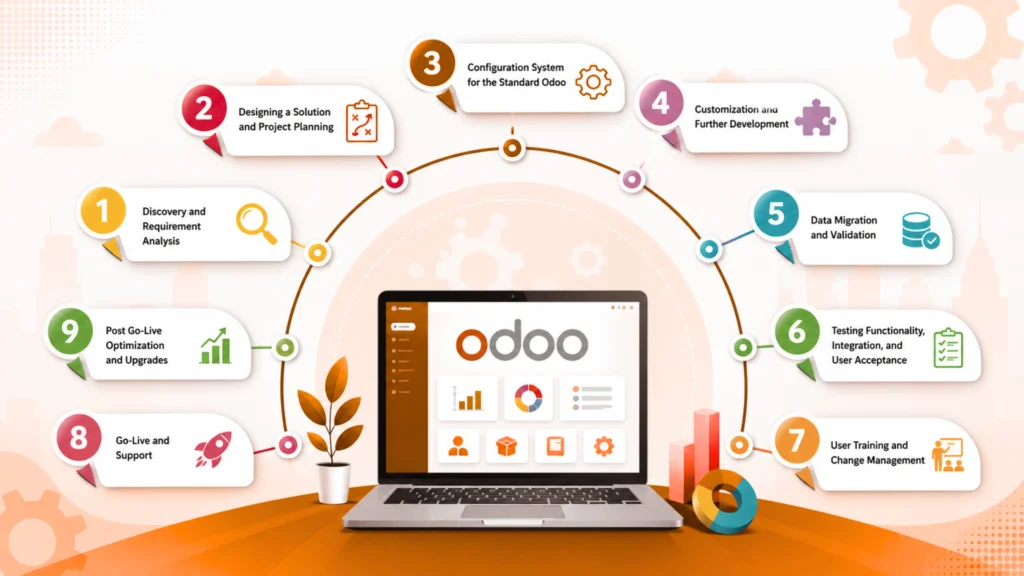
The key Odoo implementation phases are as follows:
- Discovery and requirement analysis- Understand what your business needs are and conduct a thorough analysis of the requirements.
- Designing a solution and project planning- Prepare a basic solution to your requirements, and then prepare the beginning of your project.
- Configuration system for the standard Odoo- Analyse the standard Odoo and then configure the same with your business.
- Customization and further development- If the standard Odoo doesn’t cover enough features, opt for customization for further development.
- Data migration and validation- Once customization and development are done, data will be validated and further initiated for migration.
- Testing functionality, integration, and user acceptance- Before deployment, thorough testing will be done. Functional testing, integration test, and user acceptance test are done.
- User training and change management- The users are thoroughly trained on how the system works post-deployment of Odoo. This is to help them become familiar with the change in the management system
- Go-Live and Support: The ERP is taken live, and deployment support is offered.
- Post go-live optimization and upgrades
Why is It Important to Choose Professional Odoo Implementation Services?
Choosing professional Odoo implementation services in the long run can help navigate the complexities of ERP implementation. Being experts in the field, they can play a significant role in avoiding potential ERP implementation mistakes.
Many businesses consider Odoo to be user-friendly and therefore implement it themselves with minimal support. This can create a wide range of challenges, such as the following:
- An incomplete implementation that doesn’t address the crucial business needs.
- Difficulty in integrating the existing tools and systems.
- A lack of proper Odoo user training is leading to poor adoption and affecting workflows.
- Project termination leading to wasted investments.
- An Odoo data migration failure can result in corrupted data.
Professional Odoo ERP implementation services can play a significant role in driving long-term growth. Their understanding of the market and technical expertise caters to successful integration.
Why Pre-Go-Live Validation Matters?
While preparing the Odoo go-live checklist, it is important to configure it and sign the UAT. In these cases, the system appears ready from the project standpoint. However, in some cases, even if your system looks ready, small issues like incorrect workflows or permission errors can lead to disruptions after go-live.
It revolves around permissions that may not fully align with the roles, workflows tested in isolation, and localization that may differ when live transactions are processed. Each of these problems can disrupt the operations after the go-live phase.
A focused pre-launch validation is extremely crucial for mitigating the risks. This helps reduce post-launch issues and improve user confidence.
Some of the key guidelines to follow are as follows:
1. Defining Business Goals and Requirements
For a successful Odoo data migration, it is important to understand your business goals and requirements. Document the current business highlights and the key areas of concern. Assign the function to every operation.
Defining the business goals, such as reporting, invoicing, inventory accuracy, and response time, is crucial to achieving the goals. Connect the workflow to the standard Odoo workflow and continuously monitor performance to optimise the customization.
Follow standard Odoo implementation roadmap for access and ownership.
2. Choose the Correct Odoo Edition
Odoo ERP implementation services can help identify the correct edition for your business. There are different editions for each, and the respective communities may not have access to those technologies. Therefore, it is important to know the features and what fits your requirements.
Know the licensing cost for the per-user pricing model or enterprise-level features. Assess Odoo support, implementation, and updates, then decide on the hosting options. Seek flexibility and minimal customization for budget-friendly options or cloud hosting.
3. Select the Certified Odoo Implementation Partner
Always list the top Odoo implementation services and review their documentation standards, methodologies, and service-level agreements.
During the meeting, make sure to clarify all the requirements and responsibilities you expect them to shoulder. Choose experts who deliver value.
4. Conduct the Detailed Gap Analysis
A gap analysis will help your business understand where you fall short. It will pave the way further for successful Odoo data migration. Identifying the gaps will help you understand where configurations are required.
After this, you must identify the configuration, customization, and process adjustments that require addressing the gaps.
Prepare a thorough document of your findings. If customization is slightly more than the total scope, redesigning it will help prevent long-term maintenance issues.
5. Prepare the Project Scope and Timeline
Identify the Odoo implementation phases and assign the tentative delivery date for preventing dates. While you have a service partner, it is advisable to assign internal resources as well for quick decision-making.
Establish a Change Request process that can affect cost and timeline. However, set the scopes and boundaries to prevent exceeding the budget and effort.
6. Data Migration and Cleanup
Prepare for Odoo data migration by identifying resources and data to classify as transactional or master data. Cleaning and standardizing the data format can help in proper mapping.
For easy work, it is best to use migration systems that are easy to relate to. Furthermore, maintain data quality and build user trust through the key benefits that ERP integration have to offer. Validate the outcome with finance for streamlining finance operations.
7. Odoo Module Selection
For successful phase 1 implementation, it is advisable to select the required Odoo modules. Adding unwanted modules can increase system complexity.
There are various modules you can select from, including purchase, HR, accounting, inventory, and more. Depending on the projects, you can add advanced modules such as CRM and sales.
8. Customization and Development Checklist
As a small or medium-sized business, you should follow the Odoo go-live checklist thoroughly. Use Odoo Studio to run automated and server actions.
If you feel that Odoo Studio will not help to achieve goals, go ahead and customize them. Integrate custom modules for upgrading to save and version-controlled components. As for customization, it is advisable to do so when the standard features of Odoo do not meet your business needs.
Follow a strong development checklist and determine how customization works. Over-customizing will lead to the addition of unwanted features (sometimes) and increase the cost. Furthermore, it can also make the upgrade more complex.
9. System Configuration and Integration Planning
Configure Odoo project management, manage access rights, and maintain approval flows. You should set up the required documents, then integrate the external system with Odoo APIs.
In the initial stages, it is advisable to avoid integrating database-level components and automate audit logs and backups. This helps in improving continuity and security.
10. User Training and Change Management
Conduct a thorough Odoo user training for all the team members. Prepare the quick-reference guides, recorded demos, and SOPs. Also, inform the team about any process changes across the organisation before beginning the training.
While offering training, it is advisable to capture user feedback early and even address the resistance. Successfully implementing ERP can help in significant user adoption.
11. Testing Checklist
As a part of your Odoo go-live checklist, a testing checklist should also be prepared. Test the modules and configure the end-to-end workflow testing process for all departments. It is advisable to regularly test and validate every module against the business requirements, driving accurate outputs.
Furthermore, conduct integration testing to confirm seamless data flow across modules such as Accounting, CRM, Sales, and Inventory. Regularly execute end-to-end workflow across different departments to understand the real-time impact on business scenarios.
It is best to assess the real-life scenarios for User Acceptance Testing (UAT). Validate the performance to determine high-transaction workflows. Track the gaps and fix the issues thoroughly to prevent operational disruption.
12. Odoo Go-live Checklist and Deployment
Finalise the Odoo rollout plan using the data migration and reconciliation checklist. Freeze the stem change before deployment, and then confirm the rollbacks and backups.
Inform all users of the go-live plans and verify any required last-minute user access. At the same time, maintain security settings. Hyper care support should be activated around 2-3 weeks after deployment.
13. Post-Go-Live Support and Optimization Tasks
Odoo data migration should be a controlled transition and not the end. Therefore, it is important to monitor system performance and regularly check error logs. Identify gaps and resolve user issues to improve workflow.
Regularly track the KPIs to identify areas of improvement and scope for automation. Additionally, be prepared for annual upgrades and have a compatibility checklist ready. This would play a key role in delivering long-term value.
Do Odoo Implementation Phases Fail?
Research by Gartner found that 70% Odoo implementation phases will fail by 2027. This usually happens to businesses that are integrating ERP for the first time. One minor complication in the ERP can lead to failure.
Businesses must identify potential risks and loopholes across all Odoo implementation phases themselves before rejection. Several factors can further complicate ERP implementation, negatively impacting operations.
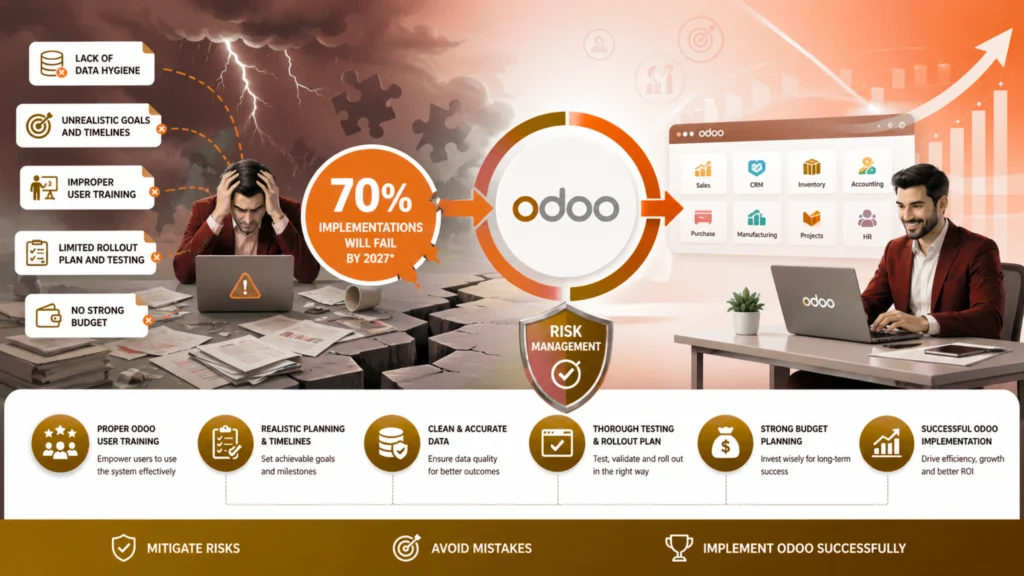
The key factors that affect successful Odoo ERP implementation services include:
- Lack of data hygiene
- Unrealistic goals and timelines that businesses set
- Improper Odoo user training
- Limited Odoo rollout plan and testing
- No strong budget
Each of these issues can lead to significant operational problems, further delaying and increasing costs. Proper risk management strategies and Odoo user training can help to implement ERP successfully. Mitigate risks by avoiding mistakes, then successfully implement Odoo.
Key Odoo Implementation Mistakes Across Each Phase
Odoo ERP implementation mistakes can be extremely expensive for your business. While in the initial runs it doesn’t seem particularly dangerous, in the long run it can have a significant impact.
Some of the key mistakes of the Odoo implementation phases include the following:
1. Excessive Module Customization
You don’t need to customize all the modules. While Odoo ERP is adaptable, over customizing it can make it unstable and increase the maintenance cost.
This becomes even more problematic for businesses when they try to replicate the old process instead of adapting to the advanced built-in practices of Odoo. It will defeat the entire purpose of upgrading the system.
While customizing Odoo ERP, ensure it’s subtle. It must match whatever your business needs and not exceed. When you upgrade the system, opt for customization that aligns with your business requirements.
2. No Clear Strategy
One of the worst mistakes of Odoo data migration is having no clear strategy. Many businesses begin without a strong Odoo rollout plan and realise this during the data migration process.
Not having a process roadmap can prevent you from reaching your goals. If you plan to figure it out along the way, it can lead to delays and multiple reworks.
Before you start an Odoo ERP implementation, it is advisable to have a clear strategy in place. Discuss with the team as to what is required and how you plan to achieve it. A systematic strategy helps to prevent the risk of project termination.
3. Ignoring Testing and Quality Assurance
Quality assurance is crucial for successful ERP implementation. Many businesses do not test or conduct quality assurance and rush into rollout.
One wrong workflow or inaccurate output will hamper the entire workflow. Therefore, business operations will be compromised.
Irrespective of your stage, it is advisable to test and ensure quality assurance. Don’t rush to meet deadlines; test thoroughly to optimise operations.
4. No User Training
An ERP implementation won’t be successful without Odoo user training. If users are not trained enough, ERP implementation will fail.
Odoo ERP may be new to many users, so don’t just assume they all know it. To maximize the benefits, it is advisable to conduct thorough user training. This should help you from day one of implementation.
5. Not Being Familiar with Integration Requirements
One of the biggest ERP implementation mistakes to make is not being familiar with the integration requirements. Odoo often needs to be integrated with third-party systems such as eCommerce platforms, CRMs, and more.
All integrations must be planned and implemented properly in advance. This plays a key role in ensuring that the output is adequate. This also plays a key role in preventing the risk of lowered productivity.
6. Overlook Data Hygiene for Migration
Maintaining hygiene is extremely crucial for successful Odoo data migration. Opting for the standard data migration process can lead to ERP implementation failure.
While transferring data, always ensure that you avoid using duplicate, corrupt, or outdated data. Never transfer the old data to your new system.
Transferring the same old data can have a negative impact and cost your business significantly due to corruption. It will create errors and even confusion. Therefore, to ensure a successful data migration, clean the data and transfer only the updated records to your new system.
7. Not Planning for Post-implementation Support
The ERP system should work efficiently without lagging, with proper support and maintenance.
Implementation isn’t where the Odoo implementation phase ends. It is, in fact, the beginning of the process. It is crucial to plan for post-implementation support as well. Odoo ERP implementation services can help you in the long run for proper integration.
Odoo Architecture and Technical Decision-Making
It is crucial to make the right decisions during the Odoo implementation phases to drive long-term maintainability, performance, and scalability. Most businesses face challenges when choosing between on-premises deployment, Odoo Online, and Odoo.sh. Each of these is different and offers its own benefits.
- Odoo Online- Simple and minimal maintenance
- Odoo.sh- Great flexibility for customization
- On-premise hosting, therefore, provides full control
Most SMEs consider integrating Odoo Online or Odoo.sh for better flexibility and scalability. When implementing an ERP system, scalability is one of the most important factors to consider. For successful Odoo project management, it must handle increasing user counts, modules, and transactions without performance degradation. Therefore, businesses will have to optimize the indexing, database structure, and server resources.
Integration architecture is also a key factor to consider. If you want simple integrations, native APIs in Odoo should offer cost-effectiveness and efficiency. Nonetheless, when your business opts for complex ecosystems, there’s integration with multiple third-party tools or middleware solutions that provide data synchronization. At the same time, these tools must lower system dependencies. Therefore, choosing the right ERP system is extremely crucial for long-term growth.
In Odoo implementations, performance optimization shouldn’t be an afterthought but a crucial requirement. From adopting clean code practices to selecting the right module, each of them is crucial. This helps in driving reliability and efficiency. A well-planned Odoo data migration can support sustainable business growth.
Performance Optimization in Odoo
To ensure Odoo implementation phases run efficiently, successful performance optimization is crucial for Odoo. Performance optimization will directly impact user experience and business productivity.
- Optimizing performance in Odoo helps businesses with:
- Increasing efficiency across different modules
- Improve the response time
- Reduced Downtime
- Ensure smooth operations for business
Businesses need to adopt effective performance optimization techniques to drive scalability. As your business evolves, it becomes important to optimize performance to mitigate issues, improve the user experience, and drive stakeholder satisfaction.
Techniques to Improve Odoo Performance
As a part of successful Odoo project management, integrate techniques to improve the overall performance. Some of the most prominent ones include the following:
1. Server Performance Optimization
A well-configured Odoo server can reduce response time and improve user experience. This also plays a key role in minimizing performance bottlenecks. Distribute the load efficiently across all servers, ensuring that no single server becomes overloaded.
2. Database Performance Optimization
Organizations need to enhance Odoo databases to ensure there are no issues regularly. Database optimization increases efficiency and reduces data retrieval time. Regular database cleaning is also required to remove unnecessary records. Routine maintenance prevents the risk of slowdown.
3. Code Optimization Strategies
The Odoo ERP implementation services can assist you with code optimization strategies. Poorly written code can lead to inefficiencies and slow down the response times. Adopt best coding practices to refactor code and optimize algorithms. At the same time, it is crucial to understand the business’s evolving requirements and integrate them accordingly.
Monitor and Measure the Performance
Once all Odoo implementation phases are completed, it is crucial to monitor the performance. This is to ensure that there are no further issues and that necessary implementations are optimized.
To monitor the performance of Odoo, regularly track the key performance indicators, such as the following:
- Database query efficiency
- Response time
- Server load time
Regular monitoring helps improve efficiency and assess overall Odoo requirements. Use performance-monitoring tools to identify bottlenecks and areas for improvement.
At the same time, it is advisable to conduct user experience surveys to collect qualitative user data. These help you get a clear idea of how well aligned the implemented Odoo ERP is with your business.
Actively monitoring performance helps identify performance metrics, bugs, and get them fixed promptly. This will help to bring continuous improvement in Odoo.
Conclusion
Understanding the different Odoo implementation phases can be extremely beneficial. However, it is important to stick to the timelines and avoid mistakes. Following an Odoo go-live checklist can help to get an idea about the process and what comes next. This should help minimize risk and ensure smart integration.
Partnering with experts like Intech Group ensures the successful, correct technical implementation of Odoo. SMBs need experts who can understand their requirements and challenges. Implementing Odoo in the system to resolve the issues isn’t enough- it needs to be maintained too. That is where The INTECH Group comes in and helps with successful implementation. This can drive significant growth in the long run for your business.
FAQs
How long does an Odoo implementation take?
Odoo implementation, on average, takes from 2 to 9 months. The timeline can depend on the complexity of the file. For example, simple integrations take around 2-3 months, whereas the advanced ones can take 6-9 months.
Can Odoo be implemented in phases?
Yes, Odoo can be implemented in phases. It is best to get started with the core modules and then move ahead with the additional modules.
Can Odoo be customized as per business requirements?
Yes, Odoo can be customized as per the business requirements. Odoo can easily adapt to how your business works and not change the way of working for your business.
